Blogspot.com Blogs are Redirecting to Blogspot.in or Blogspot.au
Are you using blogspot.com? and did you notice all blogspot.com blogs are redirecting to country specific URL?
For example, if you are living in India and if your blog address is http://example.blogspot.com then it will be redirected to http://example.blogspot.in Similarly If you are living in Australia and if your blog address is http://example.blogspot.com then it will be redirected to http://example.blogspot.au
Many people are thinking it will be affect their SEO rankings and Google did not inform them but actually Google already updated Why does my blog redirect to a country-specific URL? on 9th January 2012
I think its due to country to country laws. But I personally think its not good for all professional bloggers who are using blogspot.com
Some Interesting Points
Q: How will this change affect my blog?
A: Blog owners should not see any visible differences to their blog other than the URL redirecting to a ccTLD. URLs of custom domains will be unaffected.
Q: Will this affect search engine optimization on my blog?
A: After this change, crawlers will find Blogspot content on many different domains. Hosting duplicate content on different domains can affect search results, but we are making every effort to minimize any negative consequences of hosting Blogspot content on multiple domains.
The majority of content hosted on different domains will be unaffected by content removals, and therefore identical. For all such content, we will specify the blogspot.com version as the canonical version using rel=canonical. This will let crawlers know that although the URLs are different, the content is the same. When a post or blog in a country is affected by a content removal, the canonical URL will be set to that country’s ccTLD instead of the .com version. This will ensure that we aren’t marking different content with the same canonical tag.
Q: How might ccTLDs affect the blogs I visit?
A: If you visit a blog that does not correspond to your current location as determined by your IP address, the blogspot servers will redirect you to the domain associated with your country, if it’s a supported ccTLD.
Blog readers may request a specific country version of the blogspot content by entering a specially formatted “NCR” URL.
NCR stands for “No Country Redirect” and will always display buzz.blogger.com in English, whether you’re in India, Brazil, Honduras, Germany, or anywhere.
For example: http://[blogname].blogspot.com/ncr – always goes to the U.S. English blog.
This special URL sets a short-lived cookie (session and/or a short life time) that will prevent geo-based redirection from the requested domain. This applies to all web browsers and all Operating Systems.
you can read all details at here http://support.google.com/blogger/bin/answer.py?hl=en&answer=2402711

Blogging Alerts, a new Technology and How to Blog providing Blogging Tips, SEO Activities, Internet Marketing, Make Money Tips, PPC, SMO & latest Technology News related to Blogger, Wordpress, Google, Yahoo, Bing, Facebook, Twitter and all types of Web Based & Window Based Applications. Learn new concepts of Professional Blogging, Search Engine Optimization, Programming & Technology
Tuesday, January 31, 2012
Monday, January 30, 2012
Why Google Adwords Keyword Tool is Showing Untitled Page in Google SERP?
Did you notice, If you will search the query "Google Adwords Keyword Tool" in Google search engine then https://adwords.google.com/select/KeywordToolExternal is showing Untitled in Google search engines result pages.

But when you will open this page (https://adwords.google.com/select/KeywordToolExternal) then you can found title as Google Adwords: Keyword Tool.

Then why Google is showing Untitled result for this query. Did you think Google is updating any new algorithm or its any type of bug?

But when you will open this page (https://adwords.google.com/select/KeywordToolExternal) then you can found title as Google Adwords: Keyword Tool.

Then why Google is showing Untitled result for this query. Did you think Google is updating any new algorithm or its any type of bug?
Top Upcoming Tablets with Price and Photos
Best Upcoming Tablets With Their Price and Photos
Are you a tablet lover? and looking for a new tablet then here you can find the list of upcoming tablets with their price and images.
Top 5 Upcoming Tablets According to Yahoo News are
(1) Sony Tablet P
(2) Asus Transformer Prime TF201
(3) Samsung Galaxy 7.7
(4) Acer Iconia A200
(5) Motorola Xoom 2
(1) Sony Tablet P
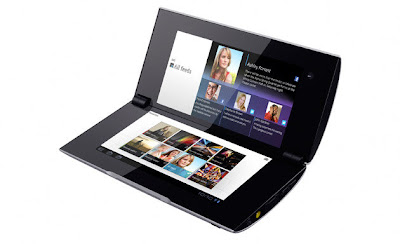
The cost of this tablet is near about $700 to $750.
(2) Asus Transformer Prime TF201

The cost of this tablet is near about $600.
(3) Samsung Galaxy 7.7

The cost of this tablet is near about $600.
(4) Acer Iconia A200

The tablet has just started selling in USA for $350
(5) Motorola Xoom 2
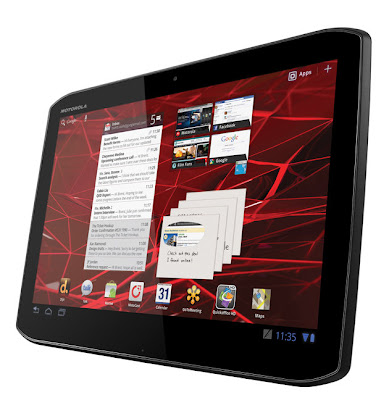
The price is near about $750 to $800.
Hope you will like this list.
Are you a tablet lover? and looking for a new tablet then here you can find the list of upcoming tablets with their price and images.
Top 5 Upcoming Tablets According to Yahoo News are
(1) Sony Tablet P
(2) Asus Transformer Prime TF201
(3) Samsung Galaxy 7.7
(4) Acer Iconia A200
(5) Motorola Xoom 2
(1) Sony Tablet P

The cost of this tablet is near about $700 to $750.
(2) Asus Transformer Prime TF201

The cost of this tablet is near about $600.
(3) Samsung Galaxy 7.7

The cost of this tablet is near about $600.
(4) Acer Iconia A200

The tablet has just started selling in USA for $350
(5) Motorola Xoom 2

The price is near about $750 to $800.
Hope you will like this list.
How to Add Or Remove Owners from Google Webmaster Tools?
Do you want to add or remove owner in Google Webmaster Tools?
Here you can find the solution for adding or removing owner in Google Webmaster Tools.
Step 1: Login to Google Webmaster Tools.
Step 2: After Login you will be redirected to Google Webmaster Tools dashboard.
Step 3: Find the option of "Manage Site".
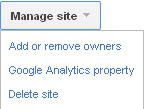
Step 4: Click Add or remove owners.
Step 5: If you want to add owner then find the option for Add an owner.

By this you can add owner.
Step 6: Now if you want to remove owner then find the option of "Unverify" below Action.

By this you can remove owner.
Here you can find the solution for adding or removing owner in Google Webmaster Tools.
Step 1: Login to Google Webmaster Tools.
Step 2: After Login you will be redirected to Google Webmaster Tools dashboard.
Step 3: Find the option of "Manage Site".

Step 4: Click Add or remove owners.
Step 5: If you want to add owner then find the option for Add an owner.

By this you can add owner.
Step 6: Now if you want to remove owner then find the option of "Unverify" below Action.

By this you can remove owner.
Friday, January 27, 2012
How to Turn off Automatic Updates in Windows?
If you are looking for solution to turn off "automatic updates" in MS windows then here you can find the steps for turn off automatic updates in your windows.
Step 1: Go to My Computer properties. (By clicking right click on My Computer)
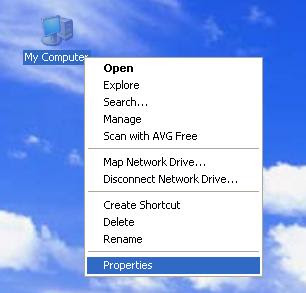
Step 2: Now find the option of "Automatic Updates" as below mentioned.

Step 3: Turn Off Automatic Updates as below mentioned (Click apply and OK)

By this method you can turn off automatic updates.
Step 1: Go to My Computer properties. (By clicking right click on My Computer)

Step 2: Now find the option of "Automatic Updates" as below mentioned.

Step 3: Turn Off Automatic Updates as below mentioned (Click apply and OK)

By this method you can turn off automatic updates.
Thursday, January 19, 2012
How to Use Old Blogger Interface?
How to Find Old Blogger Interface?
Are you using blogger's new interface and want to use old blogger interface for some reasons and could not found how to back to blogger's old interface then here you can find the solution for returning back to blogger's old interface.
Step 1: Log on to blogger new interface.
Step 2: Find the setting (small icon)
Step 3: Click on the setting icon tab as below.

Now you can use blogger's old interface. But I personally recommended try to use and learn Blogger's new interface
Are you using blogger's new interface and want to use old blogger interface for some reasons and could not found how to back to blogger's old interface then here you can find the solution for returning back to blogger's old interface.
Step 1: Log on to blogger new interface.
Step 2: Find the setting (small icon)
Step 3: Click on the setting icon tab as below.

Now you can use blogger's old interface. But I personally recommended try to use and learn Blogger's new interface
Adsense Publisher Toolbar for Google Chrome - Access Adsense as a Widget to Know Your Earnings
What is Adsense Publisher Toolbar?
The Adsense Publisher Toolbar is extension of Google Chrome browser which can show you a snapshot of your AdSense account performance as a widget in the corner of your browser window. It also includes ad overlays that describe the recent performance of specific ad units, and gives you the option to access AdSense directly.
How to Install AdSense Publisher Toolbar in Chrome?
Here you can find information regarding installing of adsense publisher toolbar in your chrome browser
If you are using Chrome then you can install this extension in your browser by installing AdSense Publisher Toolbar
Features of AdSense Publisher Toolbar
The AdSense Publisher Toolbar gives AdSense publishers two easy ways to access real-time information about their accounts and the ads served on their websites.

Pop-up account overview lets you view the following at a glance:
• Account earnings summary (today, yesterday, this month, last month)
• Top 5 custom channels
• Top 5 URL channels
• Lifetime revenue
In-site ad overlay gives you the following options right in your site:
• Instant summary of each ad unit’s earnings (today, yesterday, last 7 days)
• Links to go straight to your AdSense account
Install Adsense Publisher Toolbar directly from Chrome Web Store.
The Adsense Publisher Toolbar is extension of Google Chrome browser which can show you a snapshot of your AdSense account performance as a widget in the corner of your browser window. It also includes ad overlays that describe the recent performance of specific ad units, and gives you the option to access AdSense directly.
How to Install AdSense Publisher Toolbar in Chrome?
Here you can find information regarding installing of adsense publisher toolbar in your chrome browser
If you are using Chrome then you can install this extension in your browser by installing AdSense Publisher Toolbar
Features of AdSense Publisher Toolbar
The AdSense Publisher Toolbar gives AdSense publishers two easy ways to access real-time information about their accounts and the ads served on their websites.

Pop-up account overview lets you view the following at a glance:
• Account earnings summary (today, yesterday, this month, last month)
• Top 5 custom channels
• Top 5 URL channels
• Lifetime revenue
In-site ad overlay gives you the following options right in your site:
• Instant summary of each ad unit’s earnings (today, yesterday, last 7 days)
• Links to go straight to your AdSense account
Install Adsense Publisher Toolbar directly from Chrome Web Store.
Subscribe to:
Posts (Atom)